




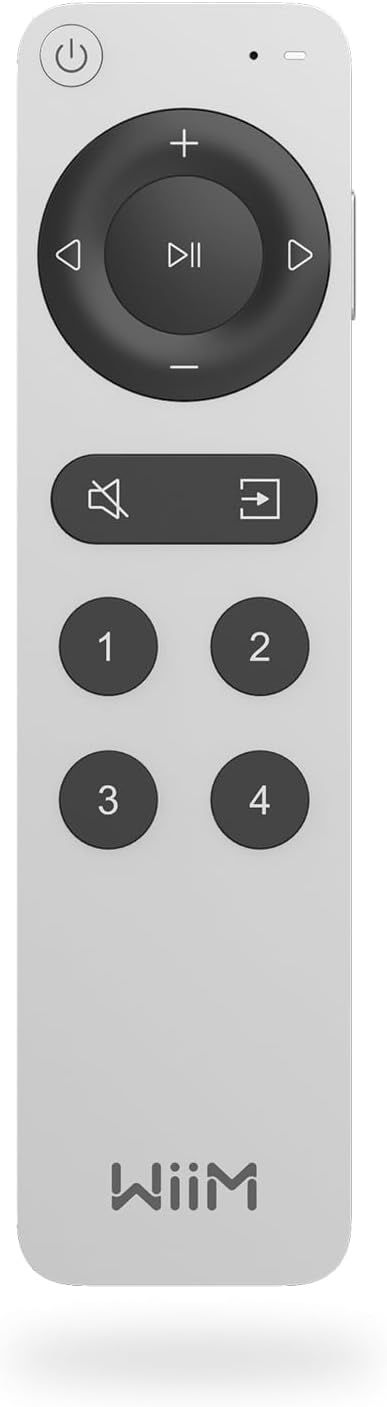


WiiM Voice Remote 2 for WiiM Music Streamers, Amplifiers, Speakers & Bars
About this item
- Seamless Voice Control - Take full control of your music with Push-to-Talk voice commands—simply press the button and speak to control your WiiM music streamers and amplifiers with ease. No additional Alexa device required! Setup Note: To use the Voice Remote with your WiiM products, first pair it via the WiiM Home app for seamless operation.
- Instant Access with Smart Presets - Enjoy one-touch convenience with 4 smart preset buttons—instantly launch your favorite playlists, radio stations, inputs, or device groups. Customize them to adjust EQ settings, switch sources, and more, all with a single press.
- Premium Build, Ultimate Comfort - Designed with a sleek aluminum body, this remote offers a modern, durable, and ergonomic feel, perfectly complementing your WiiM setup.
- Rechargeable & Eco-Friendly - No more replacing batteries—powered by a long-lasting rechargeable battery, ensuring reliable performance with convenient USB-C charging.
- 360° Bluetooth Control - Enjoy total freedom with multi-directional Bluetooth connectivity, allowing you to control your WiiM device from anywhere in the room, without pointing at the unit.
- Perfect Match for WiiM Streamers & Amplifiers - Designed exclusively for WiiM music streamers and amplifiers, the WiiM Voice Remote 2 ensures seamless integration and effortless control. Enjoy a tailored experience with intuitive navigation, optimized presets, and reliable Bluetooth connectivity—enhancing your WiiM ecosystem like never before.

The Ultimate Control for Your WiiM Audio.
Control, design and smart features in one compact remote that works with your WiiM ecosystem.

Premium Aluminum Design.
An aluminum body that balances modern styling with durability and a comfortable, ergonomic grip.

Seamless Voice Control.
Press Push-to-Talk and speak to play, pause, skip tracks, adjust volume or start playlists, without a separate Alexa device.

Your Music, One Tap Away.
Four programmable preset buttons launch playlists, radio stations, EQ settings or device groups with one press.

Rechargeable and Eco-Friendly.
A built-in battery recharges over USB-C, so there are no disposable batteries.

360° Bluetooth Control.
Bluetooth means no line-of-sight is needed, so you can control your WiiM device from anywhere in the room.

Made for WiiM Streamers and Amplifiers.
Designed to work with WiiM streamers and amplifiers through the WiiM Home app.

Frequently Asked Questions
Find answers to common questions about setup, compatibility, and streaming.
Make sure the WiiM device is on and connected to Wi-Fi. In the WiiM Home app go to Device, select the device, then Device Settings and Remote. Press and hold Mute and Source together until the indicator blinks yellow.
Playlists, radio stations, inputs such as Optical, Bluetooth, Line-In or HDMI, EQ settings, or device groups.
No. It is designed exclusively for WiiM products and does not work with TVs, soundbars or non-WiiM audio equipment.
A single charge lasts several weeks depending on usage. It charges over USB-C.
No. It uses Bluetooth, so you do not need to point it at the device.
No. Push-to-Talk lets you speak directly to the remote to control your WiiM device.